As it turns out, I can update my laptop to OSX Big Sur 11.7.11, meaning I don’t need to do anything too weird to install FontForge. The newest version isn’t compatible though, so I dug up the March 2020 release. Then there’s the whole security bullshit that won’t let me run it, but that’s what this is for:
sudo spctl --master-disable
sudo chmod -R 755 /Applications/FontForge.app
This still didn’t work? So I instead went with the newer March 2022 release, and that seems to open just fine even without disabling security checks.
➜  Cozette git:(magic) python3 -m venv venv

➜  Cozette git:(magic) source venv/bin/activate

(venv) ➜  Cozette git:(magic) python3 -m pip install pipenv
Collecting pipenv
...
Successfully installed ... pipenv-2026.0.3 ...

(venv) ➜  Cozette git:(magic) pipenv install
Courtesy Notice:
Pipenv found itself running within a virtual environment,  so it will
automatically use that environment, instead of  creating its own for any
project. You can set
PIPENV_IGNORE_VIRTUALENVS=1 to force pipenv to ignore that environment and
create  its own instead.
You can set PIPENV_VERBOSITY=-1 to suppress this warning.
Warning: Your Pipfile requires "python_version" 3.12, but you are using 3.13.2
from //Users/una/P/C/venv/bin/python.
$ pipenv --rm and rebuilding the virtual environment may resolve the issue.
$ pipenv check will surely fail.
To activate this project's virtualenv, run pipenv shell.
Alternatively, run a command inside the virtualenv with pipenv run.
Installing dependencies from Pipfile.lock...

(venv) ➜  Cozette git:(magic) pipenv run python build.py fonts
Building bitmap formats for Cozette...
/bin/sh: fontforge: command not found
...
Ok so I need to put FontForge into /usr/local/bin myself for this to work, but then uhhh…
(venv) ➜  Cozette git:(magic) pipenv run python build.py fonts
Building bitmap formats for Cozette...
/bin/sh: /usr/local/bin/fontforge: Permission denied

➜  /Applications chmod +x FontForge.app
➜  /Applications cd /usr/local/bin
➜  bin chmod +x fontforge

(venv) ➜  Cozette git:(magic) pipenv run python build.py fonts
Building bitmap formats for Cozette...
/bin/sh: /usr/local/bin/fontforge: cannot execute binary file
Am I just going to need to bite the bullet and install XCode command line tools? I need 20GB free for that! It’s okay, I went through some caches and music software I haven’t used in a while, so I’ve got about 30GB free now! Mwahaha, let’s see if I regret this. This is one of those things that I consider a necessary hurdle, like there are things I could work on at the same time, but I’d lose motivation if I discovered this is unsolveable without installing Arch… so I’ve been staring at the same terminal lines for hours:
==> Patching
==> Applying 6347854fa279cda0682c72dffbb402a0ce29ba51.patch
==> ./bootstrap --prefix=/usr/local/Cellar/cmake/4.2.3 --no-system-libs --parall
==> make
I’m actually kind of confused about the cmake dependency Homebrew says it has
to install for FontForge, like isn’t that exactly what installing XCode tools
was? Maybe it’s a wrapper or something. Anyway, after also installing wget, I finally got this build.py thing running! It works! Hurray!
VIII. Thaana
Despite all the glyphs I added to my fork of Cozette in the last post, there are still three languages in my world that aren’t covered whatsoever. These are Sigetvilági, Higasi, and Lilhian which are written with Thaana, Kannada, and Tangut respectively. Each of these presents their own unique challenges, which is why they weren’t added previously.
Thaana originated as a cipher script using Eastern Arabic and Dhives Akuru numerals to encode Dhivehi, also known as Maldivian. Based on this origin, the script resembles some of the calligraphic nature of Arabic and is written right-to-left (RTL). Many of the letters are composed primarily of diagonal strokes, usually ranging from 30 to 60°. This traditional style, however, isn’t particularly conducive to the creation of low resolution monospace bitmap fonts. Unifont seems to manage this by sticking to 45° angles and giving some glyphs double widths. I had considered mirroring this approach, if not simply smushing Unifont’s glyphs into Cozette’s $6\times13$ space, but decided to do further research on native Thaana fonts to find a more comfortable solution.
Thaana Font Gallery was, of course, a very helpful resource in this endeavor. There I discovered a number of fonts by Hassan Hameed which break away from the traditional letterforms. Ayeshath Fadwa is similarly inspiring, as are all the designers contributing to the Thaana Type Foundry. Nonetheless, Hassan Hameed’s purported goal to “increase readability at small sizes while maintaining the recognizable features of traditional font faces” is most suited to my purposes here and also most quickly caught my attention in the Font Gallery. This modern style, introduced in the ’50s by Himithee Thuththu, can be seen in Figure 8:
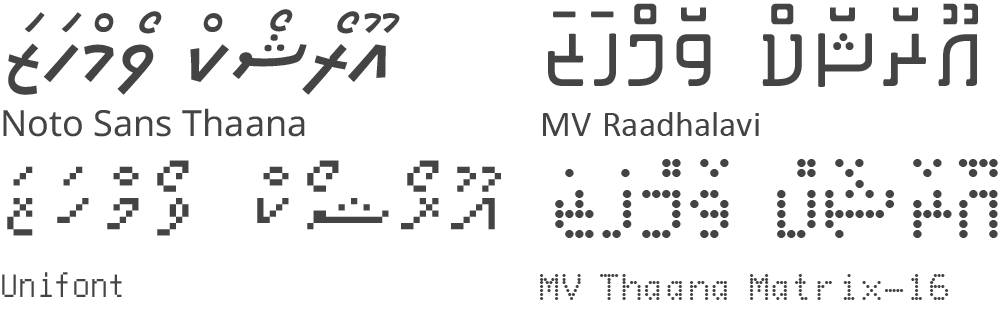

Figure 8. Comparison of traditional Thaana glyphs (left) with modern glyphs (right).1
Given all this, my approach to designing the glyphs was largely an effort to upscale the MV Thaana Matrix glyphs from their $4\times5$ form factor to the $5\times6$ space of Cozette’s lowercase letters.
For one reason or another, the combining marks used for the vowels don’t seem
to properly combine. Bitmap glyphs don’t allow for setting anchors, the
canonical solution to this, and I have no idea how to get a positioning lookup
table to work in this situation. As a sort of last resort, my solution to this
was a bit of a brute force method, simply set the character width to 0. Since
this is a RTL script, they should combine with the character to their right, and
having a right bearing of 0 would force them to overlap with said character.
This isn’t perfect, since the characters on their own will inherently be
offest to the right, but combining glyphs are weird when used on their own in
the first place.
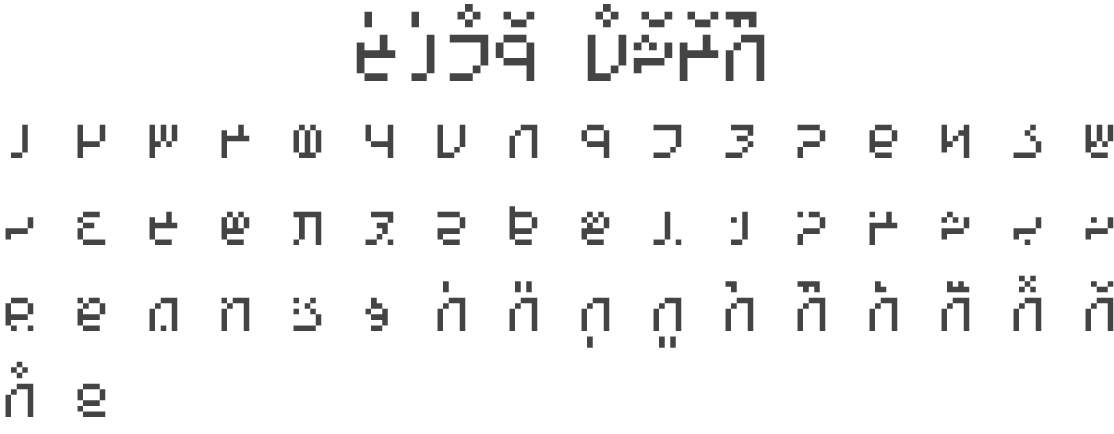

Figure 9. Modern style Thaana glyphs added to my Cozette fork.
IX. Transliteration
Now that I have a font that can be used on 猫.dev for these scripts, I ought to be able to write some JavaScript to easily transliterate something into them. This is just personal QoL tools, as thus far I’ve been manually copying and pasting glyphs to write things out.
Obviously, as far as all the scripts I’ve made along the way for this world go, the “magic script” is by far the easiest to programmatically transliterate. All I need to do is make a dictionary of inputs for each letter and then swap them out for the output. Like so:
const MAGIC = [
[['JA', 'Ja', 'YA', 'Ya'], ''], [['ja', 'ya'], ''],
[['AA', 'Aa'], ''], [['aa'], ''],
[['JE', 'Je', 'YE', 'Ye'], ''], [['je', 'ye'], ''],
[['EE', 'Ee', 'EI', 'Ei'], ''], [['ee', 'ei'], ''],
[['II', 'Ii', 'IE', 'Ie'], ''], [['ii', 'ie'], ''],
[['ER', 'Er'], ''], [['er'], ''],
[['JU', 'Ju', 'YU', 'Yu'], ''], [['ju', 'yu'], ''],
[['C', 'TSH', 'Tsh'], ''], [['c', 'tsh'], ''],
// ...
];
var input = document.querySelector('.input'),
output = document.querySelector('.output');
input.addEventListener('input', _ => {
let o = input.value;
MAGIC.forEach(i =>
i[0].forEach(j => o = o.replaceAll(j, i[1]))
);
output.value = o;
});
This isn’t a particularly elegant solution. For instance, the dictionary needs
to be strategically ordered so that one replacement doesn’t block another, e.g.
ja isn’t treated as j and a separately. Capitalization is also a bother
here, as I need to treat the two cases completely separately and account for
both all the letters being capitalized and just the first letter.
The first improvement would be to swap out the arrays of matches for regular
expressions, which would reduce the nested .forEach() to a
single instance. In that case, ['JA', 'Ja', 'YA', 'Ya'] can be
replaced with something like /[JY][Aa]/g, while
['C', 'TSH', 'Tsh'] would be /C|TSH|Tsh/g.
This also means that o.replaceAll() can just be shortened to
o.replace(), though I’m not too happy that this is based on
the need to append g to the end of all the RegEx.
Then, inspired by the scripts used in Lexilogos’ Multilingual
Keyboard, rather than specifically needing
to order the replacements such that subsets of matches come later, I could match
with the result of previous matches. For example,
[[/tsh/g, 'c'], [/ts/g, 'z'] would instead be
[[/ts/g, 'z'], [/zh/g, 'c']]; this also brings to light that
there would still be some strategic ordering necessary if, say, I also wanted
to do [/zh/g, 'ž']. Of course, this is only relevant for
scripts where the inputs and outputs share some letters, such as Østendūnska and
Sadunayitu.
I’ll also take this opportunity to make the function reusable for the other scripts and clean it up a bit (i.e. compress it into technically being a single line):2
const TRANS = (i, o, l) =>
document.querySelector(i).addEventListener('input', e => {
document.querySelector(o).value = l.reduce(
([j, k], a) => a = a.replace(j, k), e.target.value);
});
// ...
const MAGIC = [
[/[JY][Aa]/g, ''], [/[jy]a/g, ''],
[/[Aa]a/g, ''], [/aa/g, ''],
[/[JY][Ee]/g, ''], [/[jy]e/, ''],
[/E[EeIi]/g ''], [/e[ei]/g, ''],
[/I[EeIi]/g, ''], [/i[ei]/g, ''],
[/E[Rr]/g, ''], [/er/g, ''],
[/[JY][Uu]/g, ''], [/[jy]u/g, ''],
[/C|TSH|Tsh/g, ''], [/c|tsh/g, ''],
// ...
];
TRANS('.input', '.output', MAGIC);
That’s about it for this week. There isn’t much more to say on the programming side of things at the moment, as the rest is just repetitive data entry. Adding Kannada and Tangut to my Cozette fork is also mostly just data entry; obviously there’s a bit of design work that goes into it and Kannada being an abugida could make things difficult again. Basically, I’ll write a follow-up if I think there’s something worth discussing in that work, otherwise the next entry might be time to get into some actual language construction.
Footnotes
-
Turns out that, in order to render RTL text in Adobe Illustrator, you need to go into
Preferences > Type...then selectShow Indic Options. Then, in theParagraphpanel, you need to selectMiddle Eastern & South Asian Single-line Composerfrom the drop-down menu in the top right. It’s not as if fonts have some sort of flag on the glyphs to indicate writing direction, that would be absurd (this is a joke, they do have that). ↩︎ -
You can generally consider the number of “lines” to be the number of
;s, as newlines actually count as whitespace which can be removed, e.g.f(); g();is two lines, butf() && g()is technically only one, even if you put the second function on another line. ↩︎